Imported.
Item 816133
| Specification |
| |||||||
|---|---|---|---|---|---|---|---|---|
| Best use |
| |||||||
| Activation | ||||||||
| Water-resistance | ||||||||
| Waterproof | ||||||||
| Batteries | ||||||||
| Dimensions | ||||||||
| Weight |
REVIEW SNAPSHOT®
by PowerReviewsPros
Cons
Best Uses
Reviewed by 32 customers
Sort by
Displaying reviews 1-10
Previous | Next »
Pros
Cons
Best Uses
Comments about SPOT Connect Satellite Communicator:
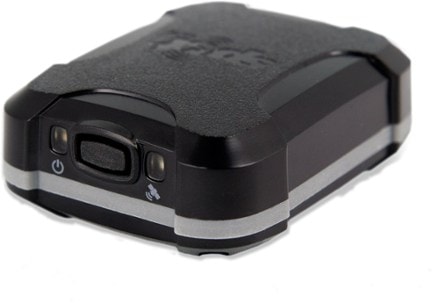
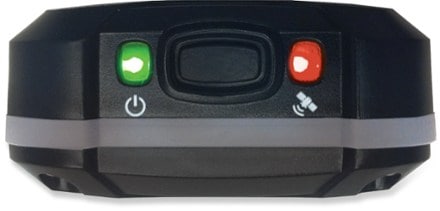
SPOT CONNECT ReviewGPS Device: SPOT CONNECT Released Spring 2011Phone: iPhone 4 iOS 4.2.1Hardware ReviewThese are so hard to find. I searched and searched until I found one (one of two) at my local REI. The hardware seems solid. The trickiest part of the device is learning what each blinking light combination means. There are five lights on the unit and each is marked with a small icon so you know its basic function. In addition, each light can either blink slow or fast, green or red to indicate varying statuses. They can also blink in tandem with other lights to signify something else. Once this is memorized it's smooth sailing.One gripe about the BTooth pairing. Getting the SPOT into pairing mode can only happen when you initially turn the device on. The SPOT CONNECT has a single button, so if you power it on and miss the BTooth pairing, you have to turn it off and back on again. Not a huge deal, but this is a life saving device so I'm being critical about every minute or so i loose to having to make it work as needed. Also, be sure to go into your phones' setting and pair BTooth there, not inside the SPOT app.Software ReviewI may skip back and forth between the website interface and the iPhone app, so please forgive me.Before hitting the trail (aka getting out of cellphone coverage) be sure to open up the SPOT app on your device and tap Settings and then tap Sync with SPOT Account. Do this every time you add/change your contacts/predefined messages via the website. That ensures any contacts and messages you created on the website will be on your phone once you hit the trail. Editing predefined message via the phone hangs the app, overtime. A pop-ip appears stating "Removing Predefined messages…Please Wait" and doesn't go away until I back out of the app and go back in. Tis is true whether "editing" or "removing" messages from the SPOT iPhone app. To avoid this problem, do not edit message on your phone. Instead edit all messages from the SPOT website.Having that said, there is a section In the iPhone app called "Other Predefined messaged in my account" in which all old messages I created are listed. For some reason they only appear on the phone and not on the website. Since they cant be deleted from the phone without hanging the app, I just leave them there. Annoying since I created many test messages and fine tune my predefined message over time to be more meaningful to the people I send them to, and the old ones just linger.BUG: After a couple days I noticed the predefined messages I create on the website appear in the iPhone app after the first sync (initiated from the phone app). However, after closing the SPOT iPhone app and re-opening it again all my predefined messages inside the app disappeared even though the website shows them as being on my device. I was able to reproduce this on multiple occasions. I tried logging out of and back into the iPhone app, syncing the app to SPOT, backgrounding the app, killing it as a background process on iPhone and restarting it and at this point i'm not able to get the predefined messages i created to show up on my phone (even though they are still listed on the SPOT website). This is obviously a huge problem since this time saving feature is not reliable and doesn't function. At this point i've spent a sum total of a few hours working on this over the weekend (deleting and recreating messages to get them to appear on my phone). No success. This forces the user to choose the more expensive "Type and Send" option. Custom messages are the reason why i bought the SPOT CONNECT, but I don't want to send them overtime. I like saving time with predefined messages and creating custom ones as needed.Sending check-in messages: Once you hit "send check-in" in the iPhone app the satellite LED on the SPOT CONNECT starts to blink. it takes about 60 seconds or so (seattle, typical cloudy day) before it shuts off and the message LED starts to blink indicating the message is being delivered. Once the screen in the SPOT iPhone app shows the message was successfully sent (indicated by a time stamp in the phone app) i cancel the operation (if not canceled it will continue to send every seven minutes or so). When i checked Facebook and my email I see no updates from SPOT. It says it sent the message on the device but my email account, Facebook and my wife never received a checkin email/text. This happened about once every three attempts.On that same note, once you've entered "Check-in/OK" Mode in the iPhone app, and then you back out to the main SPOT menu, there is no way to get out of that mode. The "Check-in/OK" menu stays grayed out and the Orange bar that appears to indicate current messages status to the user doesn't allow interaction, which is confusing. I know this was a bug since I was able to get it to behave as advertised on subsequent tries. On the times it didn't work it was necessary to turn off/on BTooth to get out of that mode and allow me to get back to the "Check-in/OK" screen to cancel that process.Message delivery times were a bit slow on my first round of tests (outdoors, cloudy with light rain). I noticed that messages to Facebook took roughly 60-90 seconds to appear. Messages to my "Family" Contact Group were also slower than I would have expected for an emergency device. To my family I had it send texts as well as email. Perhaps my expectations of delivery times and reliability for an emergency device are too high. In summary, I really wanted this to work. I often run parts of Wonderland Trail at Rainier for marathon training and the SPOT CONNECT with my iPhone sounded like a perfect setup. I'm hoping there is an iPhone app update from SPOT in the coming months that takes this from "not reliable" to "reliable enough to save lives". As is, my confidence level in this device as an aid during emergencies is nonexistent. I will keep the device until Summer starts and see if SPOT releases an app update by then. If not I will return the device and request a refund for the [$]/year service fees I paid up front for SOS service and their Progress Tracking feature.As of 4/1/2011, my recommendation is don't buy.
Pros
Cons
Best Uses
Comments about SPOT Connect Satellite Communicator:
After a little testing at home, I felt comfortable that this thing would work. its a little confusing at first but once you read the online manual you are good to go. The Iphone app is free and works well, they just updated to version 1.1. I have been looking for a satellite phone but didn't want to get rid of my phone. 14 predefined massages is more than enough and can be changed anytime. The only downside I see is that it takes about 5-15 minutes to send massages. After doing some reading, it makes sense; three satellites triangulate your position, then the massage is sent out 3 times for reliability (only one is actually received). When backpacking, you can type a massage and just leave it on a rock and forget about it. It is super reliable. The only thing I need now is a battery back-up for my phone.
Pros
Cons
Best Uses
Comments about SPOT Connect Satellite Communicator:
I had an original spot, it was a little bulky and single purposed but it provided an invaluable safety link. The only positive attribute about the connect is its size.
It does not work well with my iPad(which is what I bought it for) or my iPhone.
As a Bluetooth device I have to forget it every time I want to use it.
It takes 5+ minutes to get a satellite lock.
I found that if I don't authorize it with the spot app it doesn't talk to any other apps.
The signal is lost very easily.
I will be returning this to REI this weekend. I am very disappointed the product has great potential.
Pros
Cons
Best Uses
Comments about SPOT Connect Satellite Communicator:
OK, I would love to give this a good review but to be honest I can't. This is not ready for the public!!!
As for the overall unit.
The GPS is not accurate!!! I might get a reasonably good result putting me within 50 feet of my spot or in other cases it was off as much as 300 feet (on top of a mountain with no interferance at all). That very easily can be the difference in being found or not. It also does not seam to pick up satellites well.. I have a Garmin that picks up the satellites in same location where the Spot connect does not!!! The accuracy between the two does not even compare. The Garmin tracks excellent while the spot connect was extremely hit and miss.
iPhone app:
The app software is like a first run beta.
The bluetooth connection doesn't work. You have to manually reconnect everytime you start up. NOT GOOD IN EMERGENCY SITUATION!!!
Syncing predefined messages doesn't work. Some messages sync, and some don't.
The "check-in/OK" mode needs work. The status is not real time. The count down starts, stops, jumps. Time last check in simply is not accurate. It does not read the last check in.
Also, the app freezes sometimes. If the iphone goes into sleep mode, who knows what you will get upon resume. You may lose bluetooth connection, may return to frozen application, may get lucky and have the software resume correctly. NOT GOOD IN EMERGENCY SITUATION!!!
Since the iPhone applications doesn't work and that is how you interact with the Connect.....well then it doesn't work.
Also, in regards to the software and website. I noticed on many occasions the website was very slow. Even the customer service folks said the same thing because their end was so slow also.
Pricing and setup:
They are not forthcoming on the pricing and cost of the unit. You will be surprised with the cost of all the different subscriptions. The add-ons to get what is advertised is rediculous. The setup is lengthly and the documentation is very limited. They have a "full manual" online that is not included with the packaging. It provides some additional information, but is still lacking.
If you have read my review so far you might be asking OK... is this just a quick knee jerk reaction???? NO. I purchased my first unit about 2 months ago and spent countless wasted hours giving this thing the benefit of the doubt.
I have worked with customer care reloading the app and trouble shooting (trial and error) with them on multiple occasions. The customer service was friendly and nice, but they are not up to speed on the device. They couldn't answer many questions, and after spending countless time on the phone, without resolving the issues, they said someone would call me back. I didn't get the call back twice. When I recently followed-up I actually, got a call back the next day. The guy admitted to some of the faults and said they are working to fix them. They sent me a new unit, but I still have all the same problems.
Bottom Line:
If you are going to rely on something to save your life it has to work accurately 100% of the time. This device is not a kinda sorta maybe works item. Between the inaccuracy of the GPS and the faults in the app (iphone) I do not recommend it!!!
Only if it worked as advertised, uggg..............
Pros
Cons
Best Uses
Comments about SPOT Connect Satellite Communicator:
Although there is a failure to let consumers know up front about the [$]/year fee, my husband and family were able to follow my movements- from Florida to Montana to S. Cal. on a 7,000+ mile road trip that included lots of backcountry camping- and know I was safe. It's a cliche'-but that's priceless.
Pros
Cons
Best Uses
Comments about SPOT Connect Satellite Communicator:
Just received the Spot Connect as replacement for Spot II. Will use it backpacking and climbing when out of cell signal. I set it up indoors in my den and got a strong GPS fix and it gave a location report to the Spot website within minutes. This was impressive considering the weak signals involved and being under a roof. The type and send was a little more difficult with the weak documentation included. Finally got a message through with trial and error. Bottom line is the product is a neat piece of gear, it works and should give an extra measure of security. The previous reviewer is correct that there is scant mention of the subscription fees, but I consider them reasonable all things considered.
Pros
Cons
Best Uses
Comments about SPOT Connect Satellite Communicator:
This is a great product. This has opened up a whole new experience in the outdoor. Buy the [$] subscription, which has always been known, and head off to your destination with the security of calling for help if needed. Texting your loved ones or rescuers is invaluable. No false calls or delays in rescues. Nice job Spot. Buy one for the one you love along with a solar charger for smartphone.
Comments about SPOT Connect Satellite Communicator:
Great addition to the product line. I have the old Messenger. This new spot messenger will allow me to send custom emails. The fee for this service is priceless for those of us that spend alot of time away from cell towers and want to send messages back home. I am hoping that in the future we will also be able to receive messages from home.
Pros
Cons
Best Uses
Comments about SPOT Connect Satellite Communicator:
After taking the Spot Connect on a 7 day backpacking trip in the Wind River Range in Wyoming, I have to say that I'm pretty disappointed. The Spot Connect appears to have multiple serious design flaws and does not seem suitable for use away from Internet access/cellular coverage.
We were not able to use it for more than a day due to these design issues. The previous Spot,
though lacking text message capability, is a much more reliable/usable device.
Pre-trip testing:
We tested the Spot Connect for a few days before taking it with us. Bluetooth pairing with an Android
smartphone went very well, and we were happy with the ability to send texts. Sadly, they have
removed the buttons for all features except SOS. This requires you to have a working smartphone
for any other features. We set up a shared webpage for family, friends, and co-workers
to monitor our progress. We really wanted this to work, so even though it was a lot of extra weight,
We brought extra batteries, and even an extra smartphone just in case.
The first day:
Since there are no longer buttons to start tracking, you have to power-up the Spot and your phone and
turn on tracking from the smartphone app. Tracking remains in effect for 24 hours, then you must
power up your phone again to re-enable tracking for the next day. This worked fine on the first day,
and we even sent out a text message when we reached our first camp. Cool.
The Second day:
We powered up the Spot and the phone to enable tracking for day 2. It was a cold but beautiful
morning on a hill overlooking a secluded lake. Sadly, wearing gloves, we hit the log-out button on
the smartphone app by mistake (it was one of 2 or 3 choices). That's was it. The Spot was now dead
weight. In order to use the Spot, you had to enter the Spot password (to log-in again). OK, luckily it
was cached in an email, so we type it in. Whew. Ooops, we were then informed that we needed an Internet
connection to log-in to the Spot app. Wow, we are in the wilderness, no Internet for 6 days. A single
errant keypress disabled all features of the Spot (except for SOS (we assume)) for the remainder
of the trip.
6 days later:
Upon returning to a town with cellular service, we tried to send out an apology message through the
Spot to all those who had wasted their time trying to follow us. For some reason, we could no longer
pair to the device from the smartphones. We tried the previously successful Android phone and the
iPhone 4. Nothing worked. We tried unpairing all devices, removing the battery, everything. It doesn't
seem like the developers tested this device in any meaningful way. There are not many buttons in the App,
and to completely disable the device with a single keystroke indicates a total disregard for usability
testing. We will be returning this product and reactivating our previous (but much more useful) Spot.
=====
Pros:
=====
* The new clip design holds on very well (I didn't need the homemade contraption built for the previous Spot).
=====
Cons:
=====
* Size: Sure, the Spot is smaller than the
original, but now you need a phone (even
for basic functions), power for the
phone, and a protective case for the
phone. Total is much larger than the
original large/fat Spot.
It would be OK if the smartphone was only
required for texting, but requiring it
for all features is more than absurd.
* Extra equipment needed (smartphones, etc).
* Basic functions can be locked out very easily
and cannot be reactivated without Internet.
Not exactly a device that can be used
outside of cellular coverage.
* Smartphone operability is questionable and
required. Does not seem to have been tested
much, if at all. Feels like an Alpha
release, even a Beta release should not have
these issues.
* Ability to send text messages is nice, but
crippling all other features is a very poor
design.
Pros
Cons
Best Uses
Comments about SPOT Connect Satellite Communicator:
I was very interested in this product based on some great reviews it has received in several recent camping magazines. I am concerned that none of these reviews, nor the REI website point out that once you buy the product you have to pay $99 a year for a subscription plan. I'll pass.
Displaying reviews 1-10
Previous | Next »
How are we doing? Give us feedback on this page.
FREE U.S. STANDARD SHIPPING on orders of $50 or more.
Shop THE REI ANNIVERSARY SALE May 18–28. Plus, members SAVE 20% on one full-price item with coupon code REIANNV. Details