$250.00
Item qualifies for annual
REI Member Refund (typically 10%)
Imported.
Item 752629
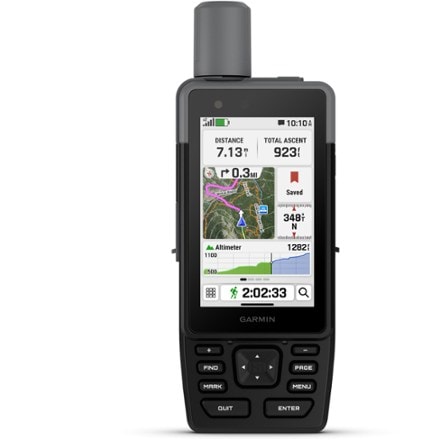
Specification | Description |
| Position accuracy | WAAS-enabled 3 meters |
| Routes | 50 |
| Waypoints (total) | 1,000 |
| Memory | microSD card (not included) |
| PC Compatible | Yes |
| Compass | Yes |
| Altimeter | Yes |
| Color screen | Yes |
| Quad helix antenna | No |
| Compact antenna | High sensitivity |
| Display size | 1.7 x 1.3 inches |
| Screen Pixels | 220 x 176 |
| Battery type | 2 AA |
| Battery life at 70 degrees | 25 hours |
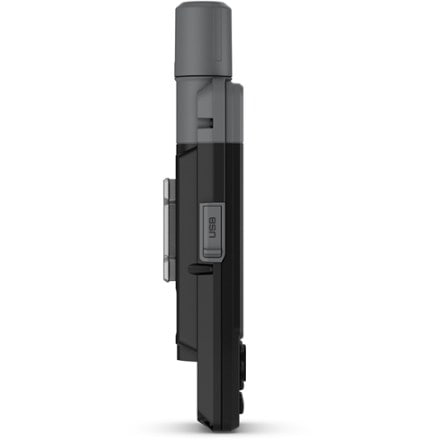
| Dimensions | 4.2 x 2.2 x 1.2 inches |
| Weight | 5.6 ounces |
REVIEW SNAPSHOT®
by PowerReviewsPros
Cons
Best Uses
Reviewed by 46 customers
Sort by
Pros
Cons
Best Uses
Comments about Garmin eTrex Vista HCx GPS:
After using the Etrex Vista for years, with its dull grey screen, and downright lousy ability to hold on to satellites-in even the lightest of forest cover-I was waiting for a GPS that would acquire satellites quickly and hold on to them through dense forest and deep canyons (something my old Vista, simply would not do). When Garmin introduced Mapsource Topo USA 2008 for Mac, and the ability to "convert" National Parks West v.3 from PC to Mac, I decided it was time to upgrade to the HCx. I couldn't be happier! The HCx starts up about 100% faster than the old vista and acquires satellites almost instantaneous! It has a beautiful color screen that displays the basemap (or Mapsource maps) beautifully! It holds on to satellites in buildings and in places most GPS lose reception. My biggest complaint is that there is absolutely no documentation for the Mac user in the box. Even on the Garmin website it is very unclear what one needs to do to transfer Maps to the unit. Once I figured this out,everything worked beautifully. The screen is small (but what do you expect for a device designed to be compact and lightweight). The toggle button is awkward and "touchy" (it's easy to toggle into the wrong place). This is not a big-deal and I'm sure I'll get used to it. Works like a dream! I'm so happy I bought this-and that Garmin is moving toward MAC compatibility!
Pros
Cons
Best Uses
Comments about Garmin eTrex Vista HCx GPS:
My wife and I received this product as a wedding present and I'm really glad we have it, but there are many times when it is really a pain and I wish REI sold a better one. First of all, the Mac support is horrible. It comes with a Windows only DVD and in order to convert it to Mac map format you need a Windows computer, and the fact that I don't have one is exactly why I need to convert it. I finally borrowed a computer to convert the maps, and still couldn't get them to work on my computer (and I'm pretty good with computers). Since I really wanted this product to work, I went out and got a 4GB microSD card so I can put all the Topo maps that came on the DVD on the GPS (using the borrowed Windows computer). The good news is that the GPS does support 4GB microSD card. The bad news is that the unit only supports 2048 maps at once and Garmin divides the US Topo Map into over 5000 "maps" so that even though I can fit all the maps in 4GB, you can't put them all in at once. I did discover a workaround that is a bit annoying: if you copy some of the maps (ie the western US topo maps) onto the GPS you can take the card out of the GPS and into a card reader and then rename gmapsupp.img (to US_Topo_West.img) then you can copy over whatever else you want to copy, and rename that, then you can switch between the ones the GPS sees by naming the one you want gmapsupp.img. In the end it works, but I can't for the life of me figure out why they have to make the maps an average of less than 1MB and then limit the number of them in this day of lots of cheap, large storage the size of your fingernail. Also, the road navigation is next to useless as it seems to only know how to tell you to take freeways without bridges and no local roads despite their appearance on the maps. The track logs are very precise, but the GPS isn't really that accurate so I'm not entirely sure what the usefulness of that is. If someone needs a GPS for the outdoors, I recommend trying to find a better one -- but I haven't at the time of writing this.
Pros
Cons
Best Uses
Comments about Garmin eTrex Vista HCx GPS:
The unit acquires satellites well and tracks without dropouts. It has, however serious performance flaws that render it unusable for the serious backcountry traveler. The first indication that something was wrong was when I tried to operate the unit with lithium batteries. Yes, I did change the battery setup to lithium! A message appeared on screen saying that the battery was too low for the backlight and the battery icon showed zero capacity. No amount of battery swapping solved the problem. More problems surfaced with the altitude function and the trip computer. The elevation displayed was sometimes correct but at other time way off! The altitude accumulators, the total ascent and total descent were always low by more than 50%. The speed window was so irratic as to be unusable, oscillating from 0 to 4 mph wildly. The odometer is consistently low compared with map measurements and measurements by other GPS units. As a result, the average moving speed and the overall speed were biased by the inaccuracy in the distance measurement. A recent hiking trip of 11.9 miles as measured by a Garmin 60CSx only recorded 9.76 miles on the eTrex VistaHCx, a 15% diference. The vertical velocity function is also irratic making any kind of climb rate estimar=te impossible. I have no confidence in any of the trip computer page data displays or any of the information displayed on the altitude page. Finally, I find the track to be accurate as long as the maps used are domnloaded from the older Map Source 3-CD set. If the 2008 West Coast data chip is used there are difficulties. First the track is displace to the east and north from the same track using the older Map Source data. Second, some of the feature on the map re either distoted or missing: near my home asection of one street is missing and another goes off on an unreal direction. Neither of these irregularities appear on the older Map Source data.
This unit should be pulled from the market until Garmin can get it's act together and correct these unacceptable errors.
Pros
Cons
Best Uses
Comments about Garmin eTrex Vista HCx GPS:
This is my third Garmin GPS unit. Each has been a marked improvement over the previous model.
The HCx has the potential to be a truly great tool. The hardware works flawlessly. Reception sensitivity is very, very good. The new MediaTek chipset really makes a difference in where you can get a usable satellite lock. An accuracy estimate of 3 meters is the norm in the open and a 6-satellite lock is common even under heavy tree cover.
However, the units own software is definitely bleeding edge. Fortunately, this can be cured with software downloads from Garmin's website as fixes are released.
Some known issues are: faulty Trip Computer odometer readings (off by miles but the Track and GPX data are accurate), some early WAAS problems and a really annoying (for me!) auto-shift to lower case after the first letter when using the onscreen keyboard. Again, these are download-fixable so do not really detract from the longterm value of the unit. It is just a matter of getting Garmin's attention and coercing a software fix out of the engineering team.
Bottom line? I love the potential of the HCx and am willing to wait for the fixes to filter down. The 2-GB SD mini card that I plugged into the unit saves every track breadcrumb in GPX format. Most topo programs have some way to import this format so the compatibility issue has pretty much gone away. I am getting 20-25 hours of battery life with disposables. The screen is bright and easy to read. I love the compact, robust size. I have owned only Garmin GPS units so I am comfortable with their controls and I/O philosophy. I have used some other makes which had a small learning curve. If this will be your first Garmin unit and you are serious about GPS then have no fear--all the bells and whistles are there. You should be up and running in a very short time.
Definitely a great tool--just waiting for a little adjustment from Garmin.
Pros
Cons
Best Uses
Comments about Garmin eTrex Vista HCx GPS:
The improved accuracy over my original Vista got me excited. I have had a number of Garmin devices and everyone tends to get better. Then I got a Vista HCX and tried it out. The biggest problem is at slow speeds where it drops distance (under about 2mph, think hiking). Even on a completely flat and straight trail, the odometer can be off by as much as 50%. Walk a mile slowly. The odometer will likely be way short. Save the track and it will correctly say you went a mile. This is great if you only want to know how far you have gone after your trip. But if you are on a hike and want to know how much further to your destination, this will do you no good. I have never seen this serious of error on a GPS before. Another more intermitent problem is that it will suddenly go way off on a hike. Hiking up Mt Si recently, about halfway back down, the track strayed significantly (half a mile) from my up-hill track. Towards the end it seemed to correct it self. I also had a Garmin Edge 305 along. The track from that was spot on both directions. The most recent software upgrade hasn't fixed either problem. I wish I had gone with the 60CSx instead despite it's bigger size.
Pros
Cons
Best Uses
Comments about Garmin eTrex Vista HCx GPS:
I use my HCx everyday! I take it biking, kayaking, hiking, road trips, etc. The HCx has been an invaluable tool for my outdoor adventures. I have found that it has much better reception than other GPS's I have owned. It had my position pegged in forests, canyons and even when it was inside the console on my Jeep, places where other GPS's have failed me. The batteries last weeks if you don't run the backlight to often. It has been quite rugged for me. I drop it, keep it on the handle bars on a mountain bike, get it drenched on the kayak, etc.
On the downside, the learning curve is quite steep. It has a lot of features and it takes a while to learn them. Also Garmin's DRM on their software makes the whole Garmin experience miserable. I change laptops about every 6 months and reinstalling the Garmin software is horrible due to the way they lock it down.
All in all though if I lost mine I would be at the store buying a second one tomorrow!
Pros
Cons
Best Uses
Comments about Garmin eTrex Vista HCx GPS:
"Great product overall. Garmin products are better than most of the competition. However, This product will need two inexpensive things immediately when you pick it up. A SanDisk 1GB micro card & Map Source Topo or Roads. I say that because the built in map is nice but lacks a lot of detail. If you have the Topo software like I did, you cannot add it until you buy the Card.
** There is a known manufacture problem when hiking in very hilly areas. The math behind calculating distance walked will be wrong. The above software will correct the distance when you connect and compare the trip on the computer. Garmin says they are working on the problem and will have an update if you register the product.
**Hcx fixes reception problems that I have experienced in the past. You can even get a good fix inside a house! Walking in the Woods was to be my biggest issue with my previous Legend. Hcx is awesome"
Pros
Cons
Best Uses
Comments about Garmin eTrex Vista HCx GPS:
Primary use is for hiking/backpacking/geocaching. I love this unit. while the speed tracking is a littly quirky, and I have seen some slight deviations on the map data vs. actual location, the Vista HCx is still an excellent navigation tool for the backpacker. This unit is very versatile, I love the expandable memory, I have loaded 1/3 of US on it and still have 500 MB remaining on my 1 GB card. Screen is excellent and easy to read, even for it's small size. Start up is the fastest i have seen, screen changes updates are also very fast. Con: Mapsource software is expensive for it's limited capability. compared to DeLorme's Topo the Mapsource pales in comparison for the same price.
Pros
Cons
Best Uses
Comments about Garmin eTrex Vista HCx GPS:
eTrex Vista HCx won't show a correct elevation data unless manually calibrated each time you turn the unit on.
Say you are at the elevation of 2000 meters and unit is showing it correctly.
Then you turn it off, walk 500 meters down to a new elevation of 1500 meters, turn unit back on. It will still show the old 2000 meters.
Even if settings are 'Auto Calibration ON', 'Variable Elevation' and you leave it for many hours on, the elevation will stay incorrect 2000 meters until you manually re-calibrate it!
Each time you turn the unit on, you have to:
1. Wait it acquires 3d position
2. Press menu button
3. go to settings,
4. go to altimeter,
5. go to calibrate altimeter
6. answer 3 questions (No,No,Yes).
I contacted Garmin and they confirmed that this is by design.
Pros
Cons
Best Uses
Comments about Garmin eTrex Vista HCx GPS:
The unit acquires and holds a signal well, even in the deep valleys and heavy tree cover of the North Cascades. The display is bright and easy to read, although the interface is intricate and clumsy.
The big problem is some serious inaccuracy in the software when traveling at low speeds, such as when walking uphill in the mountains. While the absolute locations and track logs often seem to be reasonably accurate, the odometer and other functions have glaring errors: yesterday I logged tracks totaling 7.31 miles but the odometer showed only 5.95 miles. In addition, the odometer showed a greater distance on the way back, even though the route was a bit shorter.
A similar problem seems to appear in the elevation log, although I've paid less attention to this. On one hike the unit showed a minimum elevation of about 4350' and a maximum of about 5350' with a "Total Ascent" of 768 feet.
When I walk along and watch the Trip Computer page, the speed jumps around a lot (not surprising) but it often drops right to zero. I've only observed a reading below 2 kph once and I've **never** seen one below 1 kph. And when the speed drops to zero, the odometer freezes, no matter how far I travel.
This problem was not corrected by the most recent software update, version 2.40
How are we doing? Give us feedback on this page.
Shopping Cart
Find REI on:
Facebook
Twitter
YouTube
MySpace
Flickr