The REI Member Dividend
The REI dividend is a unique benefit of membership in the REI co-op. It's comprised of your member refund—typically 10% back on eligible purchases—and/or your REI Visa® card rebates.
Each March, active REI members and REI Visa cardholders who earned a rebate receive a refund in the form of an annual dividend notice.
Only active members receive annual dividend notices. To maintain your active status as an REI member, you need to make net merchandise or shipping purchases of at least $10 per year, unless you joined that year. Member numbers are issued in one name and only that person receives the member refund. Your number can be used by others in your family, but it cannot be transferred to someone else.
Questions? Call us at 1-800-426-4840 for more about your dividend or its redemption.
Please note: Garmin products can only be shipped to U.S. addresses.
Imported.
Item 825493
| Specification |
| ||||||||||||||||||||||||
|---|---|---|---|---|---|---|---|---|---|---|---|---|---|---|---|---|---|---|---|---|---|---|---|---|---|
| Best use |
| ||||||||||||||||||||||||
| Preloaded map | |||||||||||||||||||||||||
| Basemap | |||||||||||||||||||||||||
| Preloaded geocaches | |||||||||||||||||||||||||
| Wireless communication | |||||||||||||||||||||||||
| OS compatibility | |||||||||||||||||||||||||
| Camera | |||||||||||||||||||||||||
| Display size | |||||||||||||||||||||||||
| Screen Pixels | |||||||||||||||||||||||||
| Touch screen | |||||||||||||||||||||||||
| Visual map display | |||||||||||||||||||||||||
| Color screen | |||||||||||||||||||||||||
| Number of routes | |||||||||||||||||||||||||
| Number of waypoints | |||||||||||||||||||||||||
| Internal memory | |||||||||||||||||||||||||
| Expandable memory | |||||||||||||||||||||||||
| Compass | |||||||||||||||||||||||||
| Altimeter | |||||||||||||||||||||||||
| Quad helix antenna | |||||||||||||||||||||||||
| Position accuracy | |||||||||||||||||||||||||
| Batteries | |||||||||||||||||||||||||
| Average battery life | |||||||||||||||||||||||||
| Dimensions | |||||||||||||||||||||||||
| Weight |
Reviewed by 1 customer
Displaying review 1
Pros
Cons
Best Uses
Comments about Garmin GPSMAP 62sc GPS:
I purchased the 62sc after considering the other 62-series models, and also the Oregon and Montana lines. The Oregon models got bad reviews for readability in sunlight, and the Montana devices seemed too big and bulky for my tastes. What's more, I'm still not sure I completely trust touch screens in a rugged environment -- I guess I've seen too many dead Palm Pilots and cell phones.
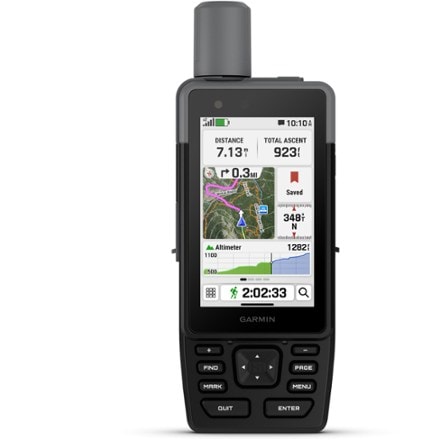
The 62 series feels good in your hand, and the buttons allow one-handed operation. I opted for the 62sc because I wanted the latest model with a camera and extra memory, but I didn't want to pay for the 1:100 topo maps in the 62stc (instead, I used that money for 1:24 topo maps of the Southeast).
The excellent GPS performance of the 62 series is documented in other reviews, so I won't cover that here (suffice it to say, it's awesome). What's unique about this model is the camera, so that 's what I'll describe here.
The 5MP camera could best be described as "capable, but basic". It can certainly document and geotag your journey, provided you have good lighting conditions.
The photos are clear and colorful, and the 5MP resolution is enough to allow significant cropping in Photoshop (and still have a photo with reasonable resolution).
The camera has a "low light" mode, but even with this enabled I had a little trouble in low light conditions -- particularly if the subject was silhouetted against a bright background.
What's more, the photos are all pretty saturated from a color standpoint, and there's no adjustment to tone this down. Speaking of adjustments, there really aren't any -- other than the low light mode, resolution, and storage location. I'd be okay with this if the camera could write RAW files (which would let me make all of the image processing decisions on my computer).
Given that this is a GPS, it's a little unnatural for taking photos -- but I managed okay. I found myself holding the antenna with one hand, holding the carabiner out of the way with the other (you can remove this), and pressing the Enter key (to snap the photo) with my thumb. At times, it's a little difficult to see your subject on the screen (if there's bright sunlight on the screen or behind your subject).
There's one other aspect I'll cover, because I couldn't find it mentioned in the manual or other reviews when I researched this purchase: What's it like on a bicycle?
I have a Garmin Edge 500 for my bike, but I wondered how the 62sc would work on longer rides when I wanted on-screen maps. It took me a while to figure out the details, but the 62sc holds up pretty well.
The device uses the same bike mount as the Oregon series, and I had no trouble getting my heart rate monitor and cadence sensor to connect. There's a "fitness" profile that integrates the stop watch and trip statistics, much like a bike computer.
Stopping the stopwatch saves a track with your ride details in an "Archive" folder on the device. If you MANUALLY upload this GPX file to Garmin Connect, you'll have graphs of your heart rate and cadence on the site (the Connect web plugin only uploads the basics). None of this is documented, as best I can determine.
What you DON'T get on the 62sc is the "Workouts" feature that tells you how far and fast to ride, and for how long. And unlike the Edge and Forerunner series, there's also no awareness of target heart rate zones on the device -- all you get is a basic BPM, and you can't set up alerts based on your heart rate.
But overall, I'm extremely pleased with the purchase (it's a bit unfair for me to compare a general-purpose GPS to specialized cameras and fitness devices). I kept my last GPS for 14 years, so I expect to get lots of use out of all of the features this device has to offer.
Displaying review 1
How are we doing? Give us feedback on this page.